

QuartzControl is the interface for Quartz, a generator for static websites. Without it you drive Quartz from the command line and edit its configuration in a text editor; with it you click. This handbook explains every screen of QuartzControl — what it does, when you need it, and what you had better not do there.
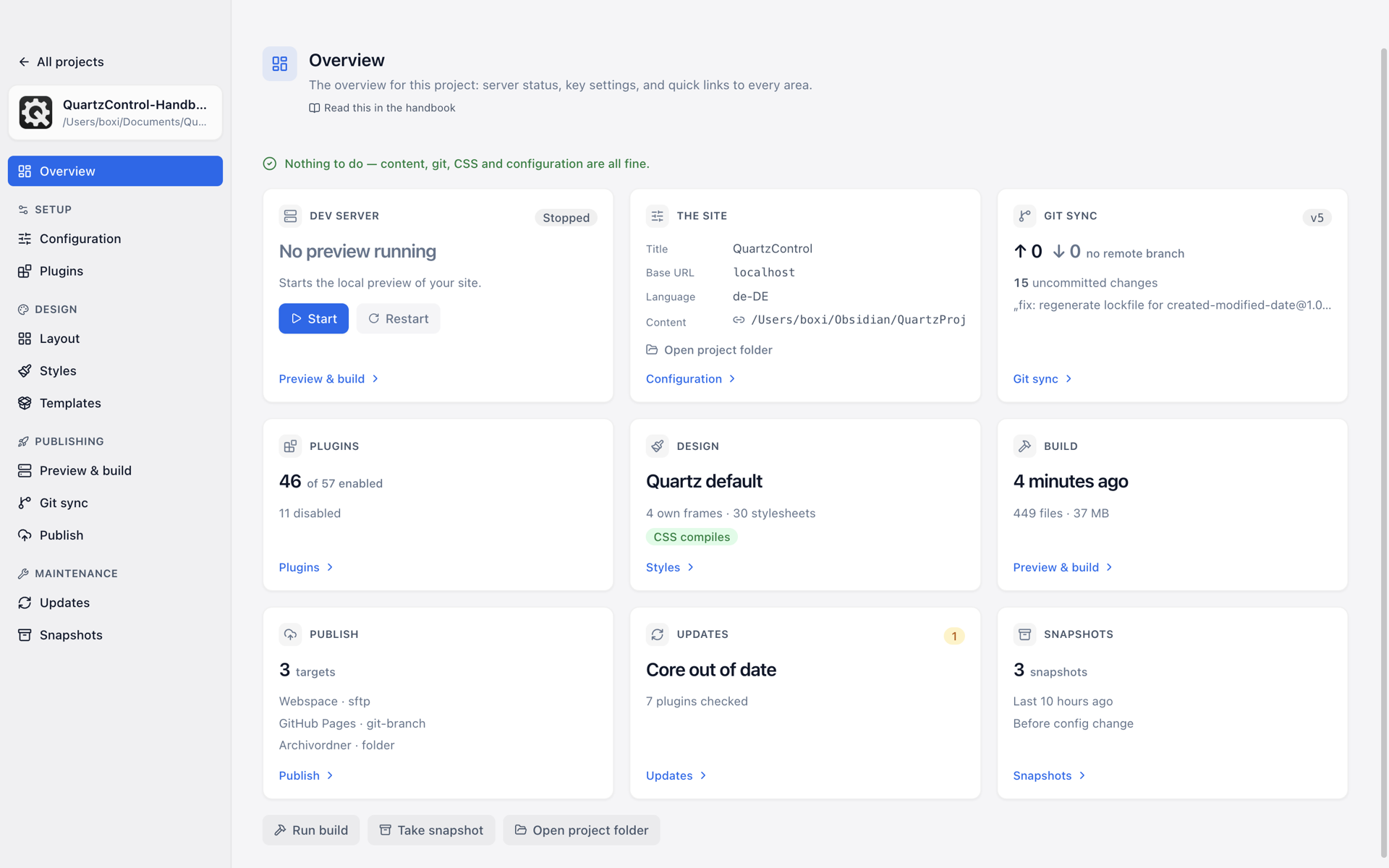
The overview of a project: preview, build, publishing, snapshots and updates at a glance.
What QuartzControl does
Notes become a website
An Obsidian vault or any folder becomes the content folder — linked if you want to keep writing in Obsidian, copied if not. You can switch later without losing a single note. → 3.4
Design without writing CSS
Plugins from a marketplace
Search, install, configure — with a form instead of YAML, and with an order you drag rather than type. → 4.8
See it before anyone else does
The preview runs in the background and rebuilds on every change; Quartz’s output is in the same window. → 5.1
Publish wherever you like
GitHub Pages, SFTP, rsync, FTP, a folder or a webhook — with a list of what will be transferred before it is. Credentials are stored encrypted in the system’s keychain. → 6
A way back
Before every larger change QuartzControl takes a snapshot by itself, a Quartz update included. And every change lands in the file it would have landed in by hand — the project can be carried on without QuartzControl. → 7
Also: several projects side by side, the fixed texts of the site (“Search”, “Back”) editable in every language, template packages to pass a design on — all of it in one program that brings its own Node and git. There is nothing to install but QuartzControl.
Two templates
Both are cut from the same cloth: colours whose contrast is measured in light and dark, four page grids of their own for smartphone, tablet and desktop, self-hosted fonts (Noto Sans and Noto Sans Mono, no request to Google), one stylesheet per component and 66 CSS variables, which QuartzControl lists under Styles → Variables.
Basic template — the start for a project of your own
Offered by QuartzControl when you create a project. Only the components each plugin needs: a mark in the header, a navigation on the left, a language switcher, a box in the sidebar. All the others are styled anyway — switch one on and it arrives the way it is meant to look. Plus, optionally, short sample pages in two languages, meant to be deleted.
Example — the showcase
The same design with every component in use, and a bilingual handbook in seven chapters that shows how to write notes so that good pages come out of them. See it at boxi-os.github.io/Quartz-Example-Template; the package
qc-example.qtplis in quartzcontrol-templates and goes into an existing project via Templates → Apply a template.
Three plugins that belong to it
The templates needed three things Quartz did not have. They were built as standalone plugins, run in any Quartz 5 project — with or without QuartzControl — and each has a handbook of its own in English and German.
| Plugin | What it does |
|---|---|
| Layout Box | A snippet of HTML or Markdown anywhere on the page — logo, notice, box in the sidebar. With placeholders, collapsible, switchable per page and per language. |
| Multilanguage | The same notes in several languages: detect the language per page, link translations, a language switcher, hreflang, redirect to the browser’s language. |
| Navigations | Navigations from the folder structure: menu bar, accordion, sitemap, previous/next under the text — ten variants, as many instances as you like, with their own behaviour on smartphones. |
The eight chapters
New here? Chapter 1 explains what Obsidian, Quartz and QuartzControl have to do with one another, and walks a first site from installation to preview.
| Chapter | The question it answers |
|---|---|
| 1 – Getting started | What is this, and what does QuartzControl take off my hands? |
| 2 – Projects | How do I create a project, add one, copy one? |
| 3 – Setup | Title, address, language — and where my notes come from. |
| 4 – Design | Colours, fonts, page grids, plugins, templates. |
| 5 – Preview and build | How do I see the result before anyone else does? |
| 6 – Publishing | How does the site get onto a server? |
| 7 – Maintenance | Going back, updating, tidying up. |
| 8 – Reference | What does this word mean? What does not work, and why? |
QuartzControl itself
| Page | For what |
|---|---|
| Obtaining and updating | Which form belongs to which system, what blocks the first launch on macOS, how a new version arrives |
| System requirements | Which systems run it, what QuartzControl carries itself, why there is no Windows build |
| Building from source | Compiling it yourself, and which checks hang on QuartzControl |
What changed from version to version is on the release pages.
What is not here
How to write notes so that good pages come out of them — formatting, callouts, bases, canvases, frontmatter — is in the handbook of the template Example (above). It is itself built with QuartzControl and shows, for every possibility, the page that describes it.
How Quartz works internally is in the Quartz documentation. This handbook explains QuartzControl, the interface in front of it.