

The fourth and last of the four layers. What is here beats everything else — and is therefore also the layer a later theme cannot reach past.
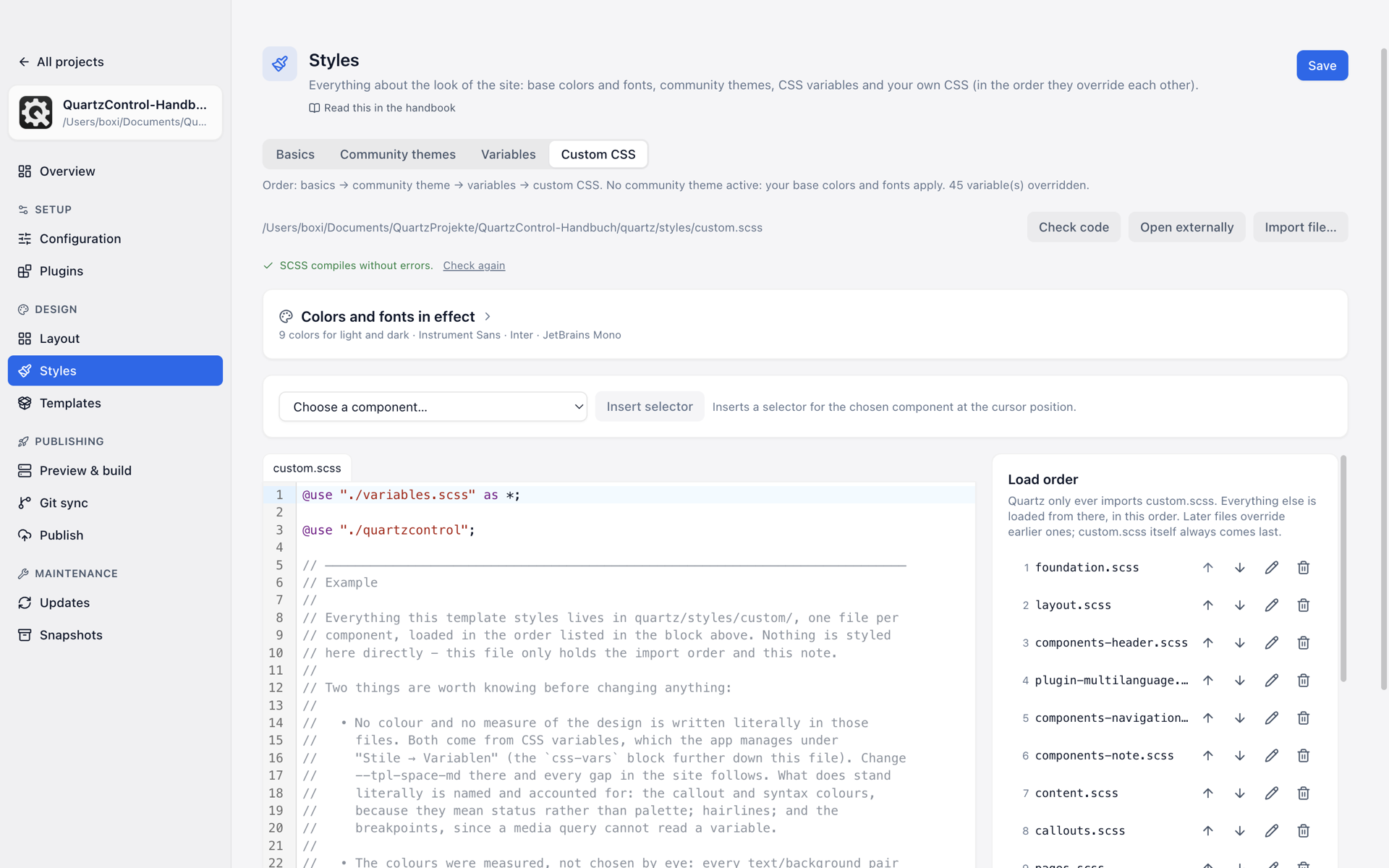
Custom CSS: the colours and fonts in effect at the top, below them the editor with the load order beside it.
The load order
Quartz includes one file only: custom.scss. Everything else is loaded from there. The card
Load order shows that chain and makes it editable:
- The arrows Move up / move down — files loaded later override earlier ones.
- New file; on every row a pencil to rename and a bin to delete. Deleting asks first. It takes no snapshot; only git or an earlier snapshot brings the file back.
- Below the files, a moved project lists
_quartzcontrol.scsswith the note fonts and variables of this page (see below). custom.scssitself is always last and cannot be moved.
Below it a second list may appear: Present, but not loaded. Those are files in the stylesheet folder that nobody loads — after a rearrangement by hand, for instance. A click on Load it hooks them into the chain.
Several files instead of one big one pay off for the same reason as everywhere: you find again what you were looking for. The example template shows how — twelve files, ordered by area.
The managed file
What the Styles page writes itself — the load order, imported fonts and the
variables — has been kept in a file of its own since 1.1,
quartz/styles/_quartzcontrol.scss. custom.scss loads it with one line before all rules of your
own:
@use "./quartzcontrol";Below that line, custom.scss belongs entirely to you again.
A project from QuartzControl 1.0 still keeps these blocks in custom.scss. The Styles page says
so above its tabs and offers Move now:
This project still keeps its load order, fonts and variables in custom.scss, as QuartzControl 1.0 did. Moving puts them into a file of their own, quartz/styles/_quartzcontrol.scss. Older versions of QuartzControl then read the project without variables and stylesheets; if you work on several machines, move all of them to 1.1 first.
The move happens only on that click, never along the way, and QuartzControl takes a snapshot first. While the page holds unsaved changes, the button is locked. A newly created project is moved from the start. A project that has not been moved keeps working as it did under 1.0; it only lacks what the move makes possible, such as a variable value that applies in light mode only.
You can look at the file: a click on its row in the load order opens it in the editor, with a note above it:
QuartzControl writes this file itself. What stands between the QuartzControl markers is rewritten by every change to the load order, fonts or variables on this page; text outside the markers is kept.
If the @use line is missing, the site loses the load order, fonts and variables without any
error. That is why QuartzControl puts it back: before every build and start of the dev server, and
when you save from this tab, then with the sentence
custom.scss was missing the line @use ”./quartzcontrol”; – it has been put back. Without it the site would lose this page’s load order, fonts and variables.
If the file itself is missing, the next build creates it empty; what was in it comes back with a snapshot.
Merging
Up to 1.0 the templates brought their styles in as many as 31 files; since 1.1 there are twelve. If a project still loads the old split, the page says so and offers Merge. Every rule is kept; it then stands section by section in the new files, each section named after its former file. Your own stylesheets stay as they are, and a snapshot is taken first. If a file of your own has the name of one of the new ones, it is renamed, and the page says what it is called now.
The check
Check code compiles what you wrote without building. Two answers:
- “SCSS compiles without errors.”
- “SCSS error, the build would fail:”, with a file and a line number and a link that jumps straight there.
That is the check that saves you a failed build. Its result turns up again on the overview — and there also the third state: CSS unchecked, which means neither “good” nor “bad”.
One error the check knows together with its way out: if an older version of QuartzControl wrote its load order inside the current one’s, Rewrite load order appears below it. The order stays as it is.
The helpers for writing
Choose a component inserts the selector for an element of the page at the cursor — so you need
not know what the explorer is called in the HTML. Every entry names the selector it inserts — the
class the site actually renders. If it says (class unverified), QuartzControl does not know the
plugin and guesses .<plugin name>.
Colors and fonts in effect shows what applies right now, light and dark, with a font sample. The box starts collapsed — folded up it only says how many colors and which fonts apply; a click on the heading opens it, and QuartzControl remembers that until the window closes. A click on a color swatch copies its value to the clipboard, a click on a font name copies the whole font stack.
A font may have fallback beside it, and QuartzControl explains what that means: the file is neither in the project nor in its build nor on this machine, and QuartzControl fetches nothing from the network — so the sample shows a different font from the site.
Original styles (read-only) shows what Quartz itself writes. For looking up, not for changing.
When two tabs touch the same file
The files of this tab are not written by the editor only: a variable override, a font import and
every change to the load order rewrite the managed file, in a project that has not been moved
custom.scss. If a file changes like that while an unsaved draft of it is here, QuartzControl says
what changed it — saving would overwrite that change — and offers to reload from disk.
When custom CSS is the right place
When there is no other. Three cases regularly are:
- Values a theme sets only inside a particular element (callout colours, say) — marked not resolvable in the Variables tab.
- Structure rather than colour: spacings, borders, line breaks.
- The known conflicts, for which QuartzControl creates the fix as an ordinary file here.
Setting a variable in custom.scss that is also changed on the Variables page works — but then
custom.scss wins (What wins).