

The Base tab is the lowest of the four layers. Here are the values Quartz works with on its own.
Colours
Nine colours, once for light and once for dark. They are not decoration: Quartz derives a whole set of further variables from them — which ones and how is shown by the Variables tab.
If a community theme is active, the colours it overrides are dimmed, with the count above them. They can still be edited — the values apply again as soon as the theme is off.
Fonts
Three roles: headings, body text and code. A font family for each.
Above them is the font source, and with it the question of where the font comes from:
- Google Fonts — Quartz fetches it from there. How it is then delivered is decided by the switch below.
- Brought yourself — Quartz fetches nothing; the font has to be in the project, for instance through the import further down.
Font delivery
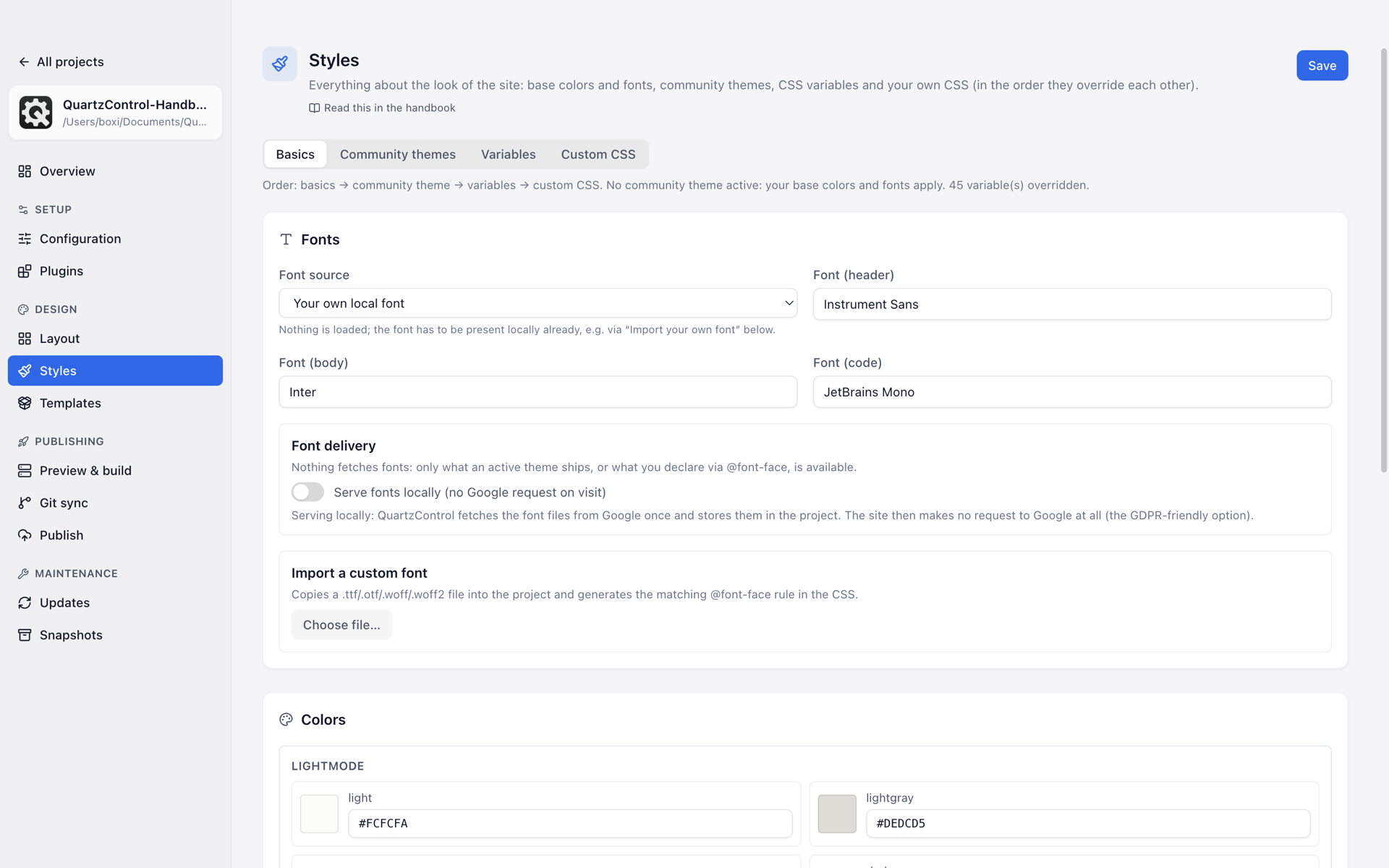
The switch sits below the three font roles; the line beneath it says what currently applies.
The switch Serve fonts locally is the most important one on this page once the site goes public.
- Off: the finished page links Google Fonts. Every visit calls Google.
- On: QuartzControl fetches the font files from Google into the project — when you save,
and again before every build if the selection has changed. They then sit under
quartz/static/fontswith their@font-facerules incustom.scss, and the page calls nobody else — the privacy-friendly variant.
What the switch removes is named
Deselect a font and its files leave the project again with the next save. The page then names it, along with how many files were deleted.
The “Fonts” plugin needs a base URL for this
If it serves the fonts itself, the font URLs are rewritten onto the base URL; without one the build fails. It is set under Configuration → Base URL. This does not apply to the switch above: the files sit in the project and are addressed relative to the stylesheet.
Below it, one line says what actually applies right now — whether the Quartz core or the “Fonts” plugin delivers the fonts, and whether linked or local.
The theme’s own fonts
If the active theme brings fonts of its own, it loads them from unpkg.com — that is a third-party
call too, and it cannot be served locally. It stays a decision:
- Theme fonts on: designed as intended, at the cost of a call to unpkg.
- Theme fonts off: no call, but the font roles from above take over, and the theme looks different from how it was meant to.
Importing a font of your own
Takes a .ttf, .otf, .woff or .woff2 from the filesystem, puts it in the project and writes the
matching rule into the custom CSS. Optionally it can be assigned to one of the three roles right
away.
QuartzControl reads the font weight out of the file and says what it found — including when it found nothing: “The file names no ‘weight’, so the rule is written without one.” The font is then available, but without a statement of whether it is bold or light.