

A template package is a single file ending in .qtpl.
It holds a project’s design: colours, theme, stylesheets, fonts, layout, frames, plugins,
translations. After importing it into another project, everything there is set as it is here.
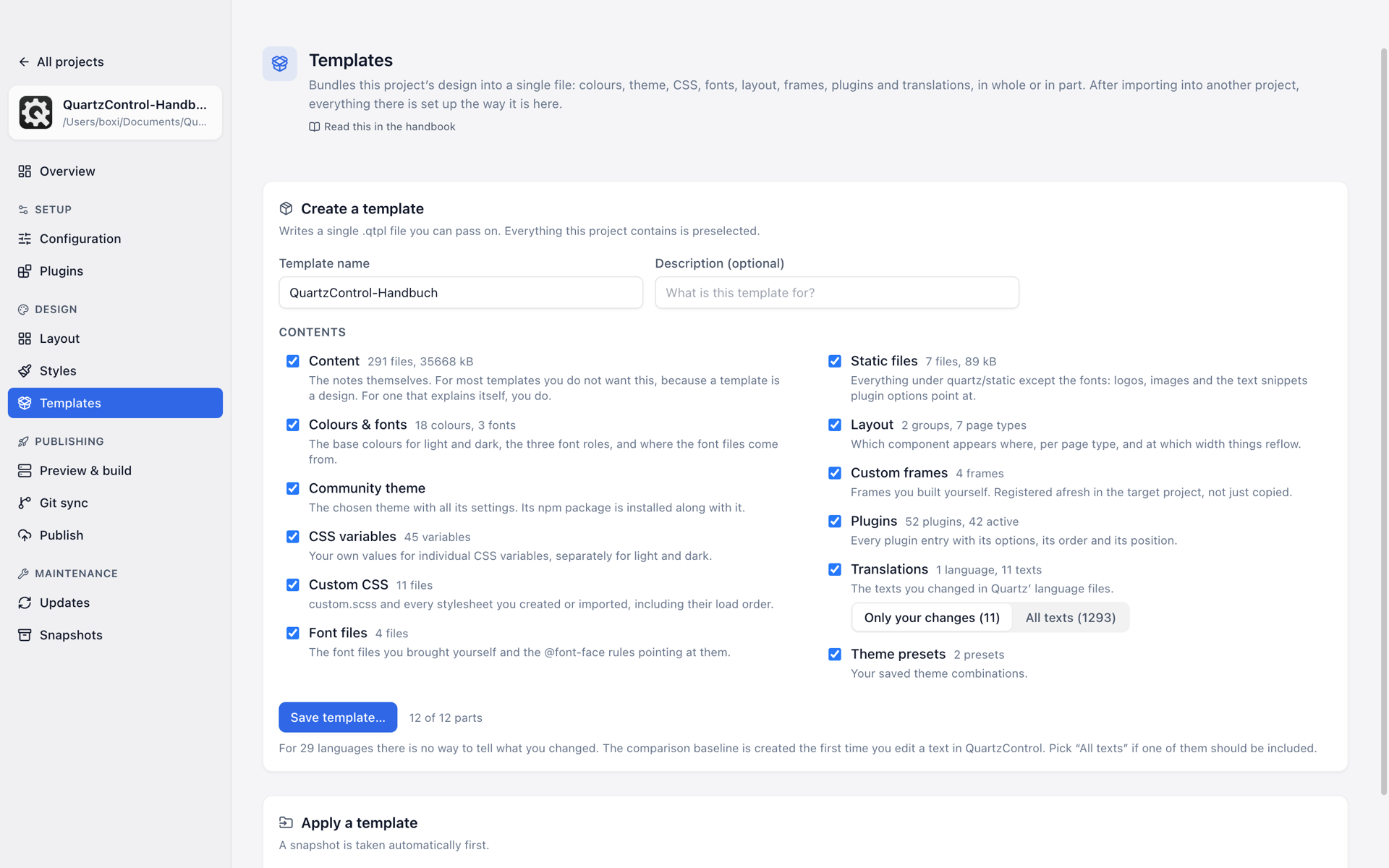
The templates page: “Create a template” with the twelve parts on top; “Apply a template” follows below.
The twelve parts
A package is not one unit but twelve. On export and on import, every part can be picked or left out individually:
Content · Colours & fonts · Community theme · CSS variables · Custom CSS · Font files · Static files · Layout · Custom frames · Plugins · Translations · Theme presets.
Two of them in detail:
- Custom CSS brings
custom.scss, all stylesheets and their load order — for QuartzControl’s templates since 1.1, twelve files ordered by area. - Static files is everything under
quartz/staticexcept the fonts: the project image, the images underquartz/static/imagesand the snippets boxes point at.
The first part is the special one: the notes themselves. For most templates you do not want that — a template is a design. For one that explains itself, you do.
Exporting
Everything the project has is selected to begin with; whatever is missing does not appear at all. Each part states what it contributes — number of files, size.
For the translations there is an extra question: All texts or Only your changes. The latter needs a baseline for comparison, and that comes about only once you have edited a text in QuartzControl. If it is missing for a language, QuartzControl says so and recommends “All texts”.
Two size limits are built in, and both have the same sentence behind them: a template is a design, not a media library and not a backup. If the static files or the content are too large, QuartzControl names the part to take out.
Importing
Choose a template… opens a .qtpl file. Beside it, Basic template loads the template
QuartzControl creates new projects with — the same as in the wizard. For it, only what makes the
look is selected at first; plugins, layout, translations, presets and the sample pages are one tick
away, so they do not end up among your own notes and plugins.
On conflict you decide who wins:
- Template wins — whatever this project already has is replaced by the template.
- Project wins — whatever this project already has stays; only what is missing is added.
Before importing, QuartzControl shows a preview: what each part would do, how many files would be new, how many existing ones replaced, and what is skipped. Along with sentences about what you would otherwise only notice afterwards: which plugins are switched on and which off, which font files go with replaced rules, and which CSS variables the template’s stylesheets read that the project does not have — those come with the “CSS variables” part.
That preview is the point of the whole feature. It answers the question you have before the click — what do I lose? — before anything happens. Only then is it applied, and even then a snapshot is taken first.
Old and new split of the stylesheets
Up to 1.0 the templates brought their styles in as many as 31 files, since 1.1 in twelve. When one meets the other, the project afterwards loads not both but one split, and the preview says which:
- Template wins — the template’s stylesheets replace those of the other split in the load order. The old files stay in the folder.
- Project wins — the project keeps loading its split; the template’s stylesheets go into the folder but are not loaded. A project in the old split merges later with Merge.
Stylesheets of your own that belong to neither split stay loaded either way.
Between QuartzControl 1.0 and 1.1
A package from 1.1 can be imported into 1.0.x, but 1.0.x does not know the new split and loads the twelve stylesheets beside the old ones. If you work on several machines, update all of them first and exchange templates after that. A variable value that applies in light mode only arrives in 1.0.x as a value for both modes. Into a project whose styles have not been moved in 1.1 yet, the import writes it the way 1.0.x can read it.
What a package may not do
A .qtpl is a file somebody handed on — QuartzControl treats it accordingly. Two limits are noticeable as a
user:
A template writes nothing into a linked content folder. If content/ is a
link to a vault, the content
part is skipped, and QuartzControl says why: pouring somebody else’s notes into your own vault could not be
undone.
No part writes outside the project. Every filename from the package is checked before it is touched.
The bundled template
QuartzControl brings the basic template — the same template the wizard offers when a project is created and the Basic template button loads here. Once a day QuartzControl looks on GitHub for a newer version; of the downloaded and the bundled one it takes the newer. The line beside the buttons says which it was.