

A CSS variable is a named value the stylesheets use in many places. The Variables tab is the third of the four layers: what is here beats the base and the theme.
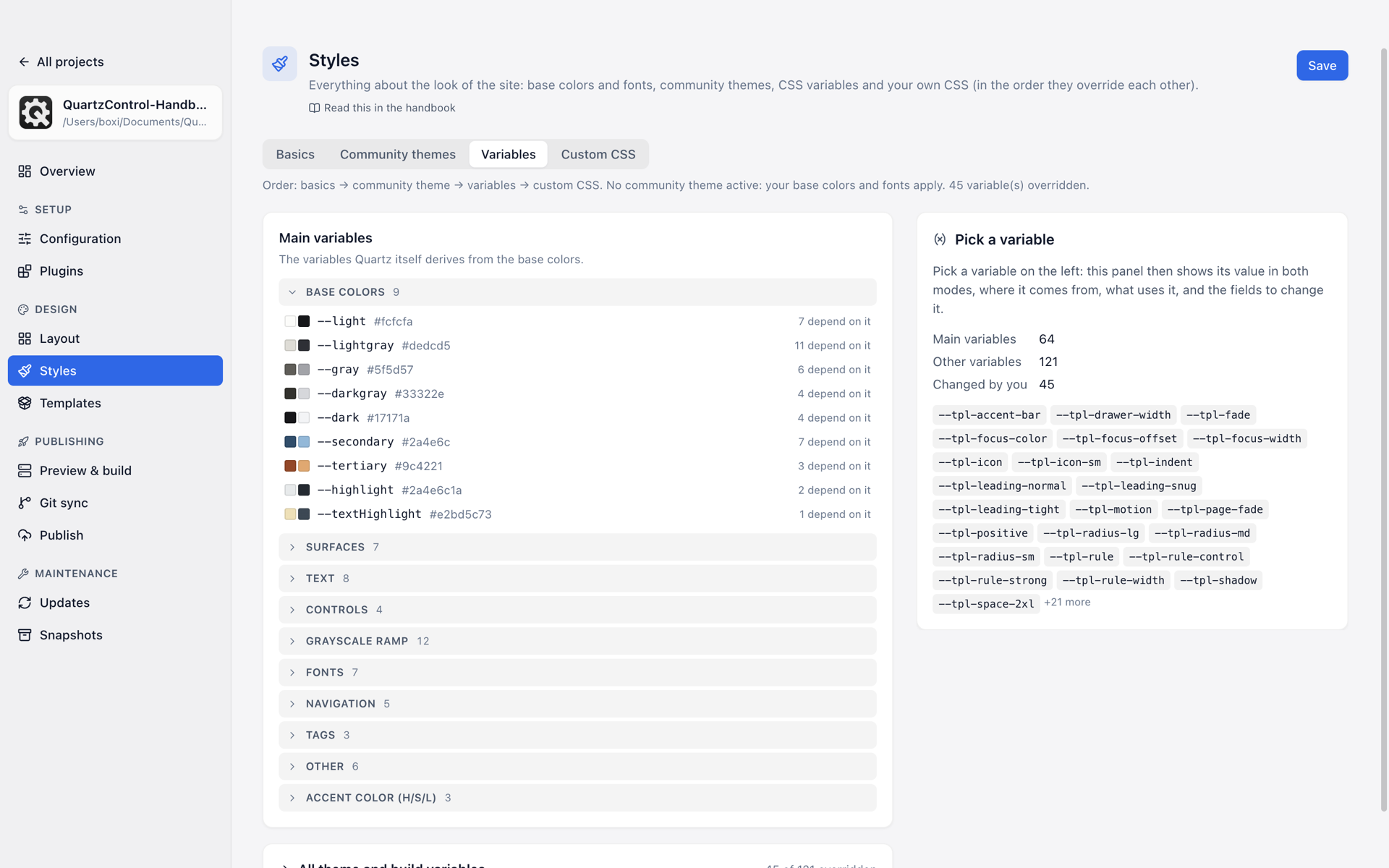
On the left the variables, grouped by role, per row how many depend on it; on the right the chosen one.
Choosing a variable
The variables are on the left, the panel for the one you have chosen on the right. While none is chosen, the panel counts how many there are and how many you have changed, and lists the changed ones to jump to. With a variable chosen it shows five sections:
- Current value — what applies in light and in dark mode.
- Origin — where the value comes from: Quartz core, community theme, last build, a stylesheet of the project, or whether you changed it yourself. Along with the chain down to the actual value.
- Uses these variables — what its value refers to.
- Used by these variables — what changes along with it. Every name is a jump there.
- Your own value — the fields to change it.
The fourth section is the most important one. When it says “Your own value here affects 7 other variables.”, that is not a warning but a piece of information: you are not changing one colour, you are changing a family.
Light and dark
A colour has two fields, Light and Dark. Every other variable — sizes, fonts, spacing — has one field Light and dark; where a value has to differ on a dark ground, a shadow or a font weight say, Different in dark mode opens the second field, and Same in both modes takes it away again. Reset to original value takes your own value away entirely.
If a variable is set differently in the two modes by the theme and you change only its light value, the change applies in light mode only. The dark one stays what the theme says, and follows the theme when you switch themes. That is how QuartzControl writes it from 1.1 on in projects whose styles have been moved. In a project that has not been moved yet, it writes the theme’s dark value explicitly as well, because older versions cannot read a value for light mode only.
A variable that neither Quartz nor the theme knows, one from a template say, has no original value. The panel says so, and instead of resetting there is Remove variable.
What wins
The values of this page sit in three rules: one for both modes, one for dark mode and one for values that apply in light mode only. All three beat Quartz and the theme, even where the theme sets the same variable.
Since 1.1 they no longer beat rules of your own in custom.scss: the managed file comes before
them, and with the same selector whatever comes later wins. If custom.scss sets a variable itself
that is also changed here, the tab names it above the list and adds:
Since 1.1 its rule comes after this page’s and wins where both are equally specific – the site then shows the value from custom.scss, not the one here.
The one exception is a value that applies in light mode only: its rule is more specific than a plain
:root and wins against it in light mode. If you want to set such a variable in custom.scss
yourself, write :root[saved-theme="light"].
All theme and build variables
Below the main variables is everything the active theme, the plugins or the last build bring in variables — kept apart, because there can be a great many.
That is why the list is grouped by how the names begin — callout, background, table —, every
group collapsed and with its count. Names that share their beginning with no other variable are
collected at the end under Single variables. If you already know the name, search for it;
Colors and Other values narrow both down to one kind of value. The card’s header says how
many of how many are overridden. A filter Changed only shows what you touched yourself.
If it says “There is no build output yet”, the source is simply missing: build once, then Reload. Until then the header does not know the total either and only says how many are overridden.
What does not work here
Some variables are set by a theme only inside a particular element — a callout’s colours, say. Such values cannot be overridden globally here, and the row says so: “not resolvable (only set inside a selector)”. That needs custom CSS.
If the variable has a value of its own but a variable inside it has none, it says “not resolvable (a variable it uses has no value here)” instead — it can be overridden then, only the swatch cannot show what it comes to.
When variables are the right place
When a theme almost fits. Changing a single colour in it without giving up the whole theme happens exactly here — and stays readable, because a counter says how many deviations there are by now.
If you find yourself overriding more than a handful of values, the theme is usually the wrong one.